Facebook Live Video Ads: The Full Guide (2026)

Live Shopping
November 23, 2026
Remi Drogoul
Blog Image

Facebook live shopping is back, and this time it comes with paid reach. With Facebook Live Video Ads, brands can promote a live broadcast to shoppers who don't follow their page, while the show is running. Paired with Meta's Live Shopping Tools, those viewers can browse products, check prices and buy without leaving the stream.

That combination makes Facebook the most complete place to sell live on Meta today. This guide covers how Facebook Live Video Ads work, how in-stream checkout works, how to set up the campaign in Ads Manager, how Shopify brands run promoted shows with Videowise, and how to budget and measure your first tests.

Key takeaways

  • Facebook Live Video Ads promote a live broadcast beyond your followers and deliver only while the show is live.
  • Meta announced the global expansion of the format on Facebook on June 18, 2026, alongside its launch on Instagram.
  • On Facebook, live ads pair with Live Shopping Tools, so viewers can browse products, see prices and check out inside the stream.
  • You set up one live video ads campaign in Ads Manager, then turn on promotion and set a lifetime budget for each show.
  • With Videowise, Shopify brands promote a show from the same place they schedule it, with native checkout on Facebook, comment-to-buy, and checkout in the player on their own store.

What are Facebook Live Video Ads?

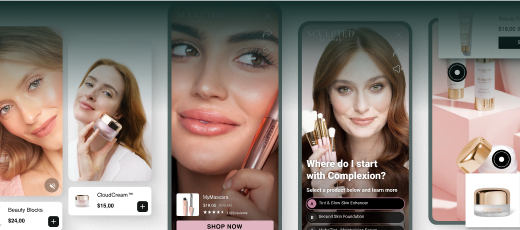
Facebook Live Video Ads are a Meta ad format that promotes a live broadcast to people who don't follow the page. The ad delivers in Facebook while the stream is live, and viewers who tap it join the broadcast in real time. Paired with Live Shopping Tools, they can browse products and buy without leaving the live video.

The format turns a live show into a paid media placement. Instead of relying on followers and notifications to fill the stream, brands buy the audience for the length of the show.

FeatureFacebook Live Video Ads
What it promotesA live broadcast, to people beyond your followers
When it deliversOnly while the show is live, up to 12 hours
Campaign setupOne live video ads campaign in Ads Manager, reused for every show
BudgetA lifetime budget per show
Extra placementsInstagram Feed, Stories and Reels (optional)
ShoppingLive Shopping Tools: browse, see prices and check out inside the stream

Facebook live shopping in 2026: what changed

Meta retired its original Facebook Live Shopping feature in 2022 and shifted focus to Reels. For a few years, brands that sold live on Facebook had to send viewers to their own site to buy.

The 2026 version is built differently. Live shopping on Facebook is now tied to advertising: the Live Video Ad brings in the audience, and Live Shopping Tools handle the shopping inside the stream. That matters for ecommerce brands because both halves of the funnel, reach and conversion, now sit in the same broadcast.

How Facebook live ads work

A Facebook live ad is attached to one scheduled broadcast. It is created before the show, reviewed by Meta, and runs only while the stream is live.

  1. Create a live video ads campaign once. In Ads Manager, the campaign is set up for live video ads and reused for every show.
  2. Schedule the broadcast. The ad needs a live with a set start time.
  3. Attach the ad to the show. Pick the campaign and set a lifetime budget for that broadcast.
  4. Pass Meta's review. Schedule early so the ad is approved before you go live.
  5. Go live. The ad delivers for the length of the show, up to 12 hours, and stops when the stream ends.

The same ad can also run on Instagram Feed, Stories and Reels as extra placements. If Instagram is your main channel, read our guide to Instagram Live Video Ads, which covers those placements and Instagram live shopping in detail.

Meta Live Shopping Tools: checkout inside the stream

Live Shopping Tools are what make Facebook different from every other Meta placement. During a promoted live, brands can pin products to the broadcast, and viewers can:
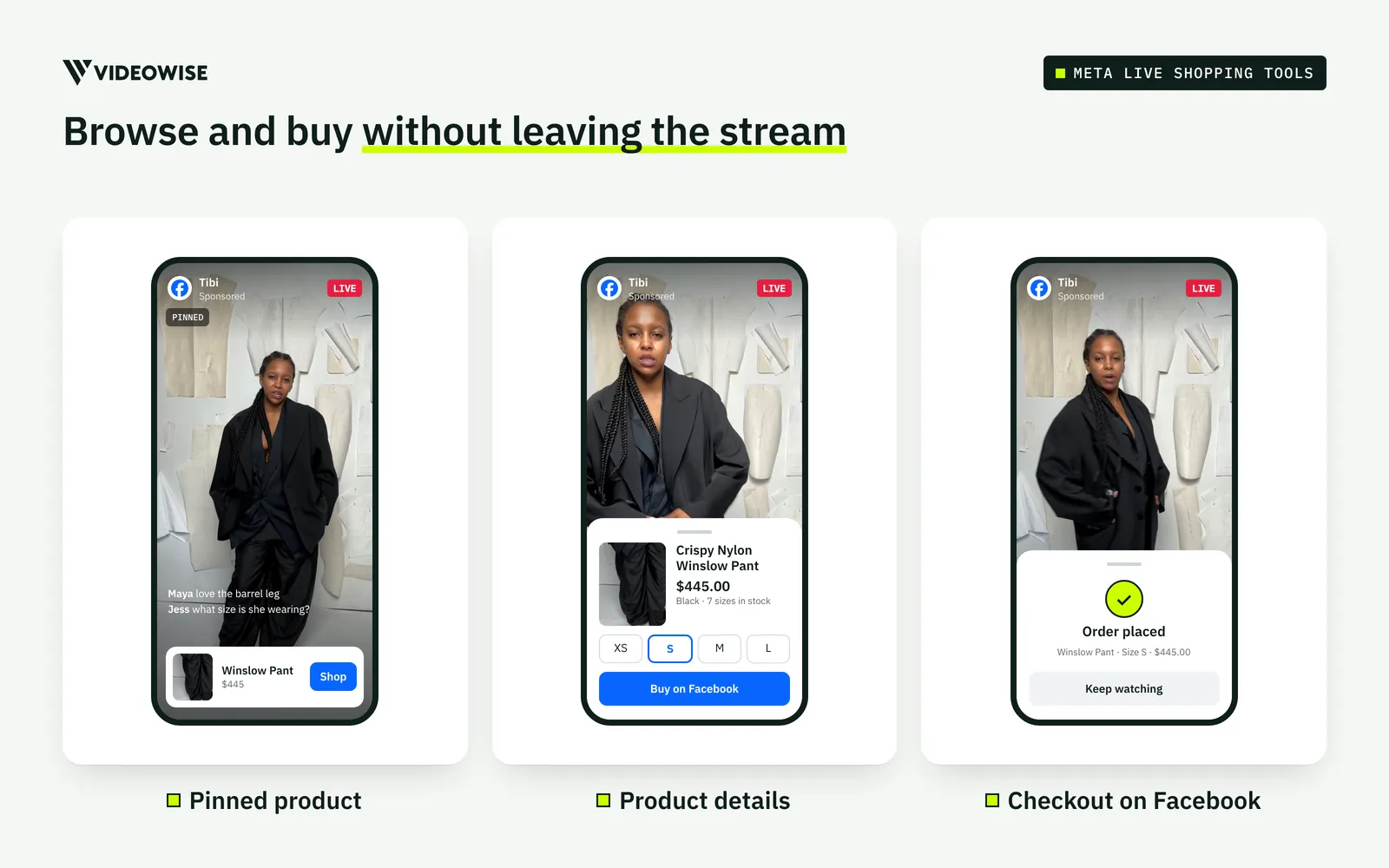
  • Browse the products featured in the show without leaving the video.
  • See prices and details while the host demos the product.
  • Check out natively on Facebook, so the purchase happens while the viewer is still watching.
facebook live ads, instream checkout

Comment-to-buy works alongside it. A viewer comments a product code and gets a direct message with a checkout link, which helps shoppers who prefer to buy on your site or come back later.

For Shopify brands, native checkout depends on your catalog: the Facebook and Instagram sales channel needs to be installed on Shopify, with the products you plan to pin approved in the catalog.

How to set up a Facebook live video ads campaign

The campaign is a one-time setup. Videowise customers do it with their success manager, then reuse it for every show.
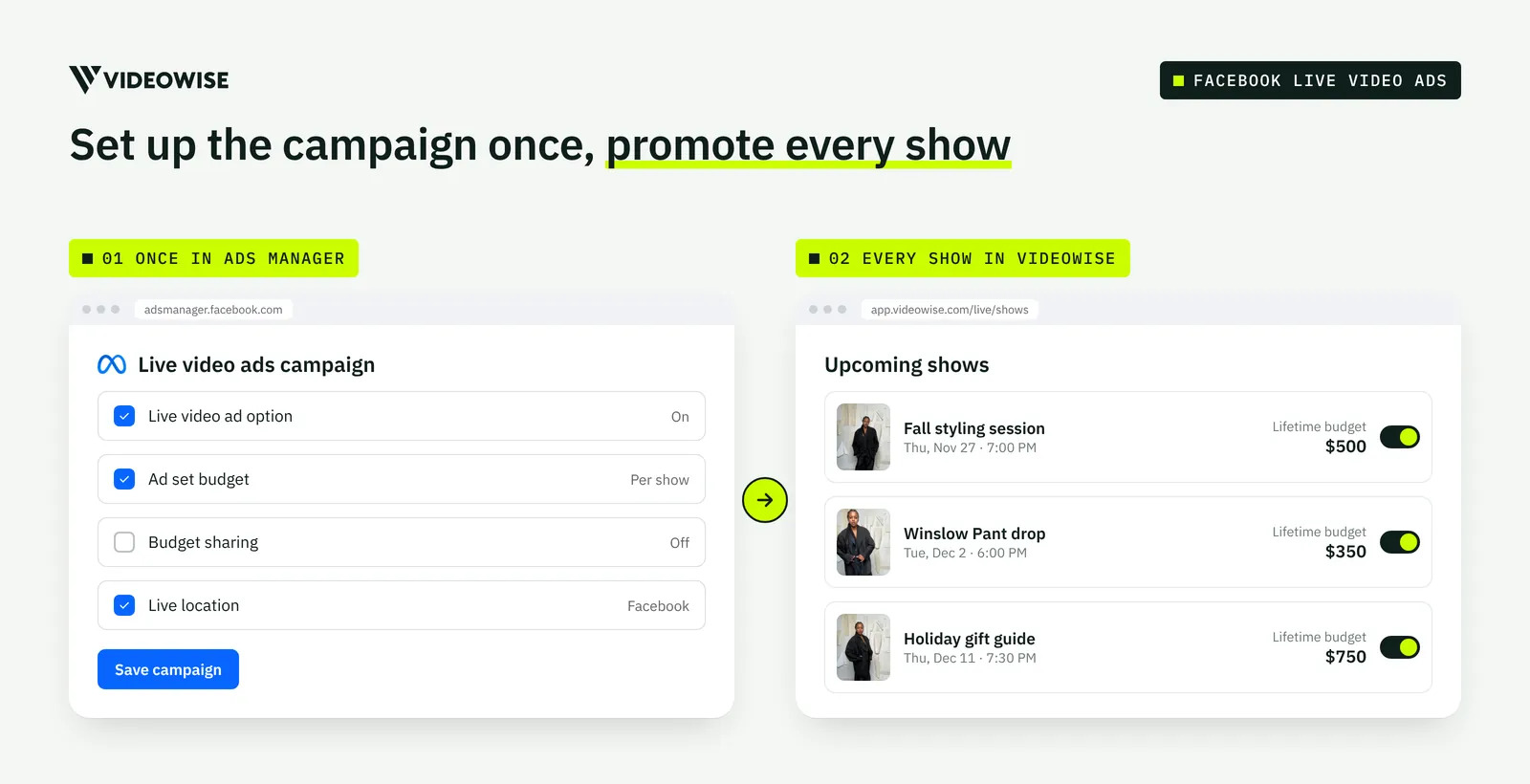
  1. Create a new campaign in Meta Ads Manager using an objective that supports live video ads.
  2. Turn on the live video ad option at campaign level.
  3. Use an ad set budget and switch off budget sharing, so each show's ad controls its own spend.
  4. Set the location to Facebook for where the live happens, and choose your audience.
  5. Save the campaign without a live attached. Each show's ad is added to it later.
facebook live ads setup on videowise

The full walkthrough, with screenshots, is in the Videowise setup guide for Facebook Live Video Ads.

How to run Facebook Live Video Ads with Videowise

Videowise is a Shopify video commerce platform and an official Meta Live Commerce Partner. With Videowise live shopping, you schedule the show, stream it to Facebook and your store, and promote it as a live video ad from one place.

  1. Schedule the show in Videowise. Add the products and comment codes, set the date at least 30 minutes ahead and save. Around three hours ahead is safer, since Meta reviews every live ad.
  2. Activate Facebook as a streaming channel. The show goes live on your Facebook page at the same time as your store.
  3. Turn on Promote with Live Video Ads. Choose the ad account and the live video ads campaign you set up once.
  4. Set the placements. Facebook is always on. Add Instagram Feed, Stories and Reels if you want the extra reach.
  5. Set a lifetime budget for the show. The minimum in Videowise is 10 in your ad account currency, though Meta can require more for some accounts and currencies.
  6. Go live. The ad runs for the length of the show and pauses when it ends. On Facebook, viewers buy pinned products natively. On your store, they buy inside the player.
Planning your first promoted Facebook live? A dedicated Videowise success manager sets up the campaign with you, and most brands go live within 1 to 3 business days. See Videowise live shopping.
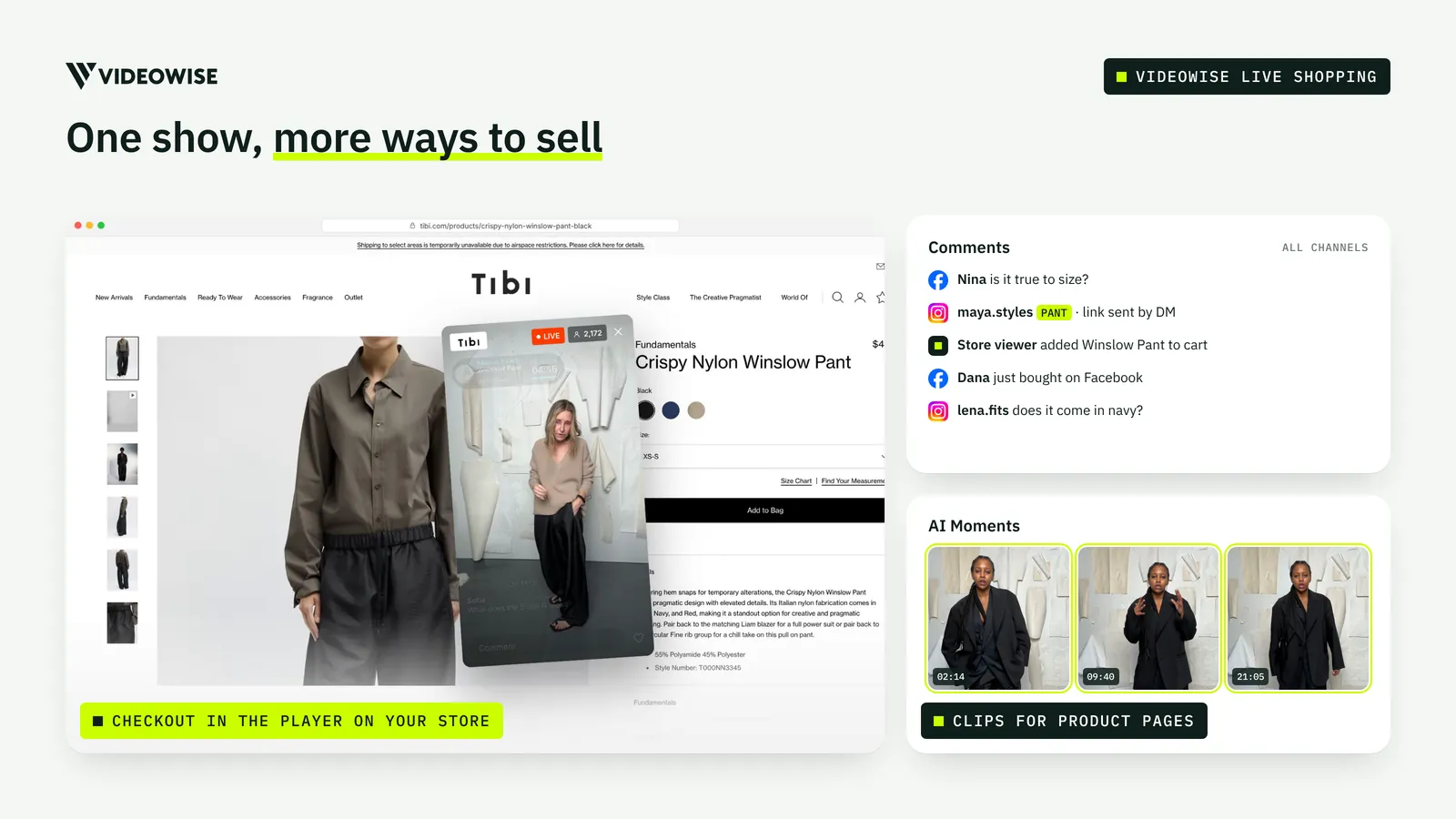
Why run Facebook live ads through a live shopping platform

live shopping on videowise pushed with facebook live ads

You can promote a live directly from Meta. A live shopping platform adds what happens around the ad:

  • One show on every channel. Stream once to your Shopify store, Facebook, Instagram and the Shop app, with comments from every channel in one place. Videowise is the only partner that runs live shows inside Shopify's Shop app.
  • Your own checkout as a second path. Viewers who prefer your store buy in the player, in your Shopify checkout.
  • Multi-host dashboards with commission payouts for shows hosted by creators or store staff.
  • AI Moments, which clip every moment a product is shown, so each live becomes shoppable video for your product pages.
  • Shoppable replays that keep selling after the paid reach ends.

Live shopping at this scale pays off: Tibi generated over $2.8M from live shopping in one year with Videowise. Videowise is rated across 400+ reviews on Shopify, G2, Trustpilot and Gartner, and supports mid-market and enterprise teams with SOC 2 Type II compliance, multi-store setups and role-based permissions.

Facebook vs. Instagram live video ads

Both placements come from the same ad, but they shop differently. Facebook is where viewers can buy inside the stream. Instagram adds reach in Feed, Stories and Reels, with comment-to-buy as the main way to purchase.

Most brands should start with Facebook for conversion and add Instagram placements once the show format works.

FeatureFacebookInstagram
Where the ad showsFacebookFeed, Stories and Reels
In-stream shoppingLive Shopping Tools: browse products and pricesNot available today
CheckoutNative checkout on pinned products, plus comment-to-buyComment-to-buy checkout link by DM
In VideowiseAlways on when you promote a showOptional extra placements
Best forConverting viewers during the showExtra reach on vertical, full-screen placements

How to budget Facebook live ads

Each show gets a lifetime budget that is spent only while you're live. That makes budgeting simpler than an always-on campaign, but the show length matters.

  • Budget per show, not per day. A 45-minute show spends its lifetime budget in 45 minutes.
  • Run long enough to deliver. Very short shows give the ad little time to find viewers. Aim for at least 20 minutes for a first test.
  • Keep budgets comparable across tests. Change one thing at a time: the product, the host, the offer or the budget.
  • Check for Meta ad credits. Meta runs a Live Video Ads incentives programme that can match spend for eligible businesses. Check current terms before you plan around it.

Facebook live ads best practices

  1. Pin products from the first minute. Paid viewers arrive mid-show and should see something to buy straight away.
  2. Say the price out loud. In-stream checkout works best when the host names the price and the offer often.
  3. Repeat the comment code. It gives viewers who want your site a second way to buy.
  4. Demo, don't present. Show the product in use, close up, and answer comments live.
  5. Start exactly on time. The ad delivers from the scheduled start, so a late start wastes paid reach.
  6. Plan the offer around the ad window. Time-limited offers give paid viewers a reason to buy during the show.
  7. Reuse the show. Put the replay and clips on your product pages so the spend keeps working.

What to measure in your Facebook live ad tests

Track the ad, the show and the checkout separately. That way you know whether a weak result came from reach, the content or the buying path.

AreaWhat to trackWhy it matters
ReachSpend, impressions, reach, cost per viewerShows whether the ad filled the show
EngagementViewers from the ad, watch time, commentsShows whether paid viewers stayed
Shopping intentProduct views, comment codes, DM link clicksShows whether viewers moved toward a purchase
In-stream checkoutOrders on Facebook, revenue, average order valueShows what the show sold inside Facebook
Total returnAll attributed orders across Facebook and your store, return on ad spendCompares every sale from the show with its budget

For more on planning and measuring live events, read our complete guide to live video commerce.

The takeaway

Facebook Live Video Ads solve the hardest part of live shopping: getting enough people into the show. Live Shopping Tools solve the next part, letting those viewers buy without leaving the stream. Together, they make Facebook the strongest Meta placement for selling live.

For Shopify brands, Videowise connects the whole show: one-time campaign setup, per-show promotion, native checkout on Facebook, checkout in the player on your store, shoppable replays and AI clips. Book a demo to plan your first promoted Facebook live.
Turn your video into revenue.
Hundreds of eCommerce brands turned video into their #1 sales channel. Don't get left behind.
BOOK A DEMO

Frequently Asked Questions

What are Facebook live video ads?

Facebook Live Video Ads promote a live broadcast to people who don't follow your page, while the show is live. Viewers who tap the ad join the stream, and with Meta's Live Shopping Tools they can browse products and buy without leaving the video.

Can people buy directly from a Facebook live?

Yes. With Live Shopping Tools, brands pin products to the broadcast and viewers can see prices and check out natively on Facebook. Comment-to-buy also works: viewers comment a code and get a checkout link by direct message.

How do I set up Facebook live ads?

Create one live video ads campaign in Meta Ads Manager, using an ad set budget with budget sharing off. Then, for each show, schedule the live, attach the ad to that campaign and set a lifetime budget. With Videowise, the per-show step happens when you schedule the show.

How long do Facebook live video ads run?

The ad runs only while the show is live, for up to 12 hours, and stops when the broadcast ends. Schedule the show and the ad in advance so Meta can review it before you go live.

Does Videowise support Facebook Live Video Ads?

Yes. Videowise is an official Meta Live Commerce Partner. Shopify brands can promote any scheduled Videowise live show as a Facebook Live Video Ad, with optional Instagram placements, while streaming the same show to their store and the Shop app.

‍
‍

This is the next-gen
Video Commerce Standard

Videowise unifies conversion, content intelligence, and scale into one platform - built for brands & retailers that expect video to drive real growth, everywhere.

the Highest 5-star rated video commerce platform ever