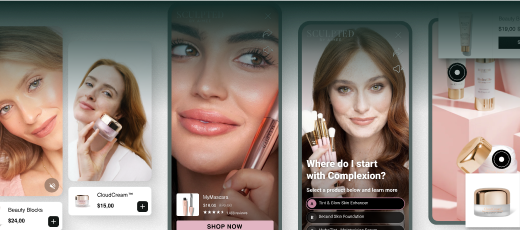
Ecommerce operators today face a persistent challenge: customer acquisition costs are rising while attention spans are shrinking. Converting social media traffic requires more than just a link in a bio; it requires a friction-free path from discovery to checkout. Learning how to make shoppable videos on TikTok is no longer an experimental tactic but a core requirement for Shopify brands looking to maximize their social commerce ROI, especially when paired with strong TikTok marketing best practices. At Videowise, we focus on turning video engagement into measurable revenue by bridging the gap between entertaining content and the transaction. This guide explores the technical setup, creative frameworks, and scaling strategies needed to build a high-converting TikTok Shop presence. By the end of this article, you will understand how to transform your video assets into direct revenue drivers that increase conversion rates (CVR) and revenue per session (RPS).
Shoppable video, as seen in Videowise's shoppable video platform, allows a viewer to purchase a product directly from the video interface without leaving the app. For an ecommerce director, this means a significant reduction in the "leaky bucket" syndrome common in traditional social-to-site funnels. When a shopper clicks a link in a bio or a story, they often encounter slow-loading landing pages or login prompts that kill momentum.
In-app checkout through TikTok Shop keeps the momentum alive. By embedding product links directly into the video, you create a direct path to purchase that rewards impulse buying and simplifies the path to conversion. Operators typically see higher Conversion Rates (CVR) when the distance between "I want that" and "I bought that" is measured in seconds rather than clicks.
The value extends beyond the initial purchase, as the Nomad the Label case study shows. Shoppable videos often lead to a higher Average Order Value (AOV) because the format allows for easier discovery of related products through TikTok’s "Showcase" feature. Instead of just viewing a single SKU, shoppers can browse your entire synced catalog while staying within the immersive video environment.
Before you can start tagging products, you must have the correct business infrastructure in place. You cannot create shoppable content on a standard personal profile. You need a TikTok Business Account, which provides access to the TikTok Seller Center and advanced analytics.
Synchronizing your product catalog is the most critical technical step. Most Shopify brands use the TikTok for Shopify app to automate this process, and a social commerce workflow helps keep those videos shoppable across channels. This integration ensures that your product names, descriptions, prices, and inventory levels are updated in real-time. If a product goes out of stock on your site, the link in your shoppable video should ideally reflect that to avoid a poor customer experience.
Activating the "Shopping Tab" on your profile is the final piece of the puzzle. This tab acts as a permanent storefront where all your shoppable content and synced products live. Once your catalog is approved and your account is linked to your Shopify store, you gain the ability to "Add Link" during the video posting process, which is the functional heart of shoppable video.
The most common way to create a shoppable video is directly through the mobile interface. This method is best for quick UGC (User Generated Content) style posts or trend-based videos that require speed.
For teams managing large catalogs or multiple stores, the Seller Center provides a more robust environment. The Shoppable Video Hub within the Seller Center offers tools designed for scale, including AI video creation and bulk management.
You can add shoppable links to videos that have already been posted within the last 30 days. This is an excellent way to monetize a video that unexpectedly goes viral.
Key Takeaway: The best shoppable videos don't look like commercials. They look like organic content that happens to have a convenient "buy" button attached.
The 3-Second Hook is the most important element of any TikTok video. If you don't stop the scroll immediately, your shoppable link will never be seen. Start with a visual "pattern interrupt"—something that shows a dramatic transformation, asks a polarizing question, or shows the product in a surprising way.
The Middle Section must demonstrate value through "Show, Don't Tell." Instead of listing technical specifications, show the product solving a specific pain point. If you are selling a kitchen tool, show it actually cutting vegetables. If you are selling apparel, show it on different body types. Use text overlays to highlight key benefits like "Waterproof," "5-Year Warranty," or "Free Shipping."
The Call to Action (CTA) must be explicit and visual. TikTok users are accustomed to fast content; they often need to be told exactly what to do. Verbally tell them to "Click the link in this video" while physically pointing toward the location where the product link appears. Using TikTok’s built-in "Shoppable Stickers" can also help draw the eye toward the checkout button.
Relying solely on in-house production is difficult to scale. To maintain a consistent posting frequency, you need to leverage User Generated Content (UGC). This involves importing videos from customers, influencers, and brand advocates. We help brands manage this workflow by centralizing video assets and streamlining the rights management process, ensuring you can legally use and monetize customer content, just as True Classic optimized CVR with Videowise shows at scale.
AI-powered tools can significantly reduce production bottlenecks. For example, using AI Clips allows you to take longer videos—like a five-minute product review or a recorded live stream—and automatically slice them into dozens of short, high-energy TikToks. This "content atomization" ensures you have a constant stream of shoppable assets without needing a full-time editing team.
Our platform enables operators to import UGC from TikTok and Instagram with a single click. This content can then be tagged with products and pushed back out to social channels or, more importantly, embedded directly on your Shopify site, as outlined in how to use shoppable videos on your ecommerce store. By using Videowise, brands can ensure that the same high-converting video seen on TikTok also drives sales on the Product Detail Page (PDP) or homepage.
Success in video commerce is measured by revenue, not views. While TikTok’s native analytics provide data on views, likes, and shares, ecommerce operators need to go deeper with Video Performance, Clearly Measured. You should be tracking Gross Merchandise Value (GMV), click-through rate (CTR) on the product link, and influenced revenue.
Attribution is often the biggest hurdle for social commerce. A shopper might see your video on TikTok, not buy immediately, but then search for your brand on Google and purchase two days later. To get a clear picture, look at "Total Influenced Revenue," which counts any sale where the customer engaged with a video during their journey.
A/B testing your video creative is essential for long-term growth. Try testing two different hooks for the same product link. One might focus on "How to use it," while the other focuses on "Why you need it." By analyzing which hook leads to more "Add to Carts," you can refine your creative brief for future shoots and influencer partnerships with the help of How to track shoppable video performance.
Bottom line: Every video is a data point. Use your Seller Center dashboards to identify which product categories perform best in video format and double down on those assets.
TikTok is only one piece of the video commerce puzzle. The most successful Shopify brands don't just leave their best content on social media; they bring it back to their own store with getting started with shoppable videos. Using video on your site allows you to capture the high-intent traffic that has already navigated to your shop.
Page speed is the primary concern when adding video to an ecommerce site. Most video players are "heavy" and can negatively impact your Core Web Vitals—specifically Largest Contentful Paint (LCP). We have built a performance-first infrastructure that allows you to embed shoppable video carousels on your PDPs without slowing down the page, as the Skullcandy case study shows. This ensures you get the conversion lift of video without the SEO penalty of a slow site.
Shoppable video on your site should feel as interactive as it does on TikTok. This means including product tags, "Add to Cart" buttons within the video player, and even inline checkout. When a customer watches a UGC video on your product page, they should be able to buy that specific item without ever leaving the video player. This consistency in user experience across social and on-site is what separates top-tier brands from the competition.
The "Over-Produced" Trap. Many brands make the mistake of using high-gloss, agency-produced commercials on TikTok. These often underperform because they look like ads. TikTok is a "lo-fi" platform; content that feels authentic, raw, and shot on a smartphone typically sees higher engagement and conversion.
Ignoring the Sound Strategy. TikTok is a sound-on platform. Using trending audio or original voiceovers is critical. If your shoppable video is silent or uses generic background music, it will likely be skipped. Use voiceovers to explain the product benefits while the visuals show the product in action.
Poor Link Placement and Timing. If you wait until the last 10 seconds of a 60-second video to show the product link, most people will have scrolled away. The product link should be active for the majority of the video, especially during the moments of highest visual interest.
Myth: "Video commerce will slow down my site's loading speed." Fact: With modern video infrastructure designed for ecommerce, you can deliver high-definition shoppable video while maintaining excellent Core Web Vitals and site performance.
Live Shopping is the "real-time" version of shoppable video. While standard shoppable videos are evergreen assets that work 24/7, live events create a sense of urgency and community. These events are particularly effective for product drops, limited-time promotions, or "behind the scenes" brand storytelling.
The setup for Live Shopping mirrors the shoppable video process. You must have your catalog synced and your TikTok Shop active, just as Andar's live shopping case study illustrates. During the live stream, you can "pin" specific products to the bottom of the screen, allowing viewers to buy while you are demonstrating the item.
Recordings of your live streams are a goldmine for shoppable video content. You can use AI Clips to take the best moments from a one-hour live event and turn them into 20 different shoppable videos for your feed. This maximizes the ROI of the time spent on the live stream and provides a library of high-converting assets for your evergreen strategy.
To move the needle on your revenue metrics, follow this operational checklist:
Mastering how to make shoppable videos on TikTok is a strategic shift from traditional social media marketing to direct-response commerce. By focusing on the intersection of engaging content and frictionless checkout, Shopify brands can significantly improve their conversion rates and revenue per session. The key is to combine an authentic, "TikTok-first" creative approach with a robust technical infrastructure that doesn't sacrifice site performance. Our platform is built specifically for this purpose—helping 4,000+ brands turn their video assets into measurable revenue across every touchpoint. Whether you are leveraging UGC or scaling with AI-powered clips, the goal remains the same: make it as easy as possible for your audience to go from discovery to purchase.
"The brands that win in 2026 will be those that treat video as a storefront, not just a billboard."
Ready to turn your video content into a high-performance revenue engine? Book a demo with our team to see how we can help you scale your video commerce strategy.
Install Videowise from the Shopify App Store to get started today.
A regular TikTok is focused on entertainment or information with a link typically limited to the bio. A shoppable video includes an embedded product link or "Product Anchor" that allows viewers to click, view product details, and purchase directly within the app's interface without interruption.
Yes, you must have an active TikTok Shop and a TikTok Business Account to use the product tagging features. This involves setting up the TikTok Seller Center and syncing your Shopify or WooCommerce product catalog so the platform can pull real-time data for your shoppable links.
You can add product links to videos that have been posted within the last 30 days, provided the content complies with TikTok Shop's community and product guidelines. This is done through the "Link Products" tool in the TikTok app or Seller Center, allowing you to monetize organic content that is performing well.
Standard video embeds can slow down your site, but using a performance-first video commerce platform ensures that videos are optimized for Core Web Vitals. By using techniques like viewport loading and optimized scripts, you can feature shoppable TikTok content on your PDPs without compromising your site's speed or SEO ranking.